【產品推薦官】邊個牛牛功能最幫到你賺錢?
I. Overview of New Features
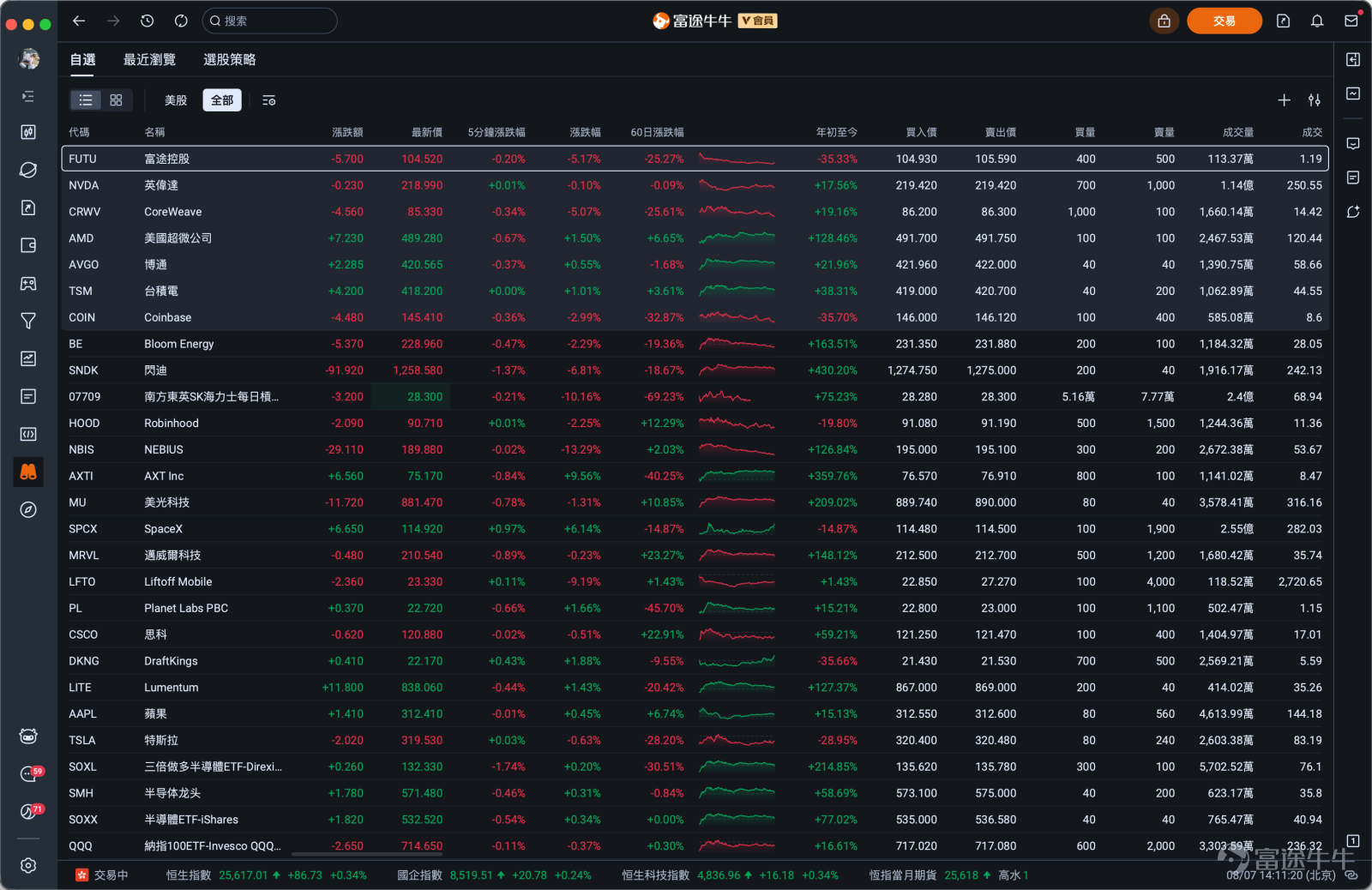
【New】Watch App Launched: Larger views for watchlists, recently viewed stocks, and stock screening strategies to efficiently capture intraday movements;
【New】Embedded Trading: Order panel accessible directly beside charts—trade while monitoring market data;
【Optimized】Chart layout upgraded with an expanded chart display area;
【New】New feature zone added—AI tools, quotes, comments, and news all visible on one screen;
II. Detailed Introduction of New Features
1. New Watch App
Path:Navigation Bar
Key Benefits:
1. Multi-dimensional data observation: 【Watch】is a brand-new standalone app covering watchlists, recently viewed stocks, stock screening strategies, and more—helping users quickly identify opportunities and make precise decisions during trading hours;
2. More immersive visual experience:Display data in a larger view for an at-a-glance understanding of market movements.

Disclaimer: The design images shown herein are for illustrative purposes only and do not constitute any investment advice or recommendation.
2. Embedded trading support
Path:Order placement page
Key Benefits:
Compared to the previous version, which only allowed a pop-up standalone order window, Futubull’s new version supports embedding the trading panel directly into the chart page, placing the K-line chart and order entry side by side on the same screen. When you spot a trading signal, you can act instantly—no need to switch windows or navigate back and forth, making the trading process smoother and more intuitive.

Disclaimer: The design images shown herein are for illustrative purposes only and do not constitute any investment advice or recommendation.
3. Upgraded chart layout
Path:Navigation bar – Chart page
Key Benefits:
Compared to the previous version, Futubull’s new chart page features a comprehensive layout upgrade: information hierarchy is more compact, and toolbar functions are logically grouped by usage scenario to minimize visual clutter. This frees up more screen space for the chart area itself, delivering a clearer, more expansive view of price movements and enabling users to focus better on technical analysis.

Disclaimer: The design images shown herein are for illustrative purposes only and do not constitute any investment advice or recommendation.
4. New Function Panel
Path:Right-Side Function Panel on Desktop Application Pages
Benefits
1. More Focused Functions:Consolidate previously scattered entry points into the right-side functional area. Click the feature bar to switch quickly without leaving the current page—frequently used functions are always within reach, making operations more centralized and efficient.
2. Supports Single-Column / Dual-Column Modes:The function panel supports both single-column and dual-column layouts, switchable via a button at the bottom to accommodate different screen preferences. In dual-column mode, quotes are fixed in the left column, while the right column freely toggles between AI insights, comments, news, and other content—displaying two sets of information side by side and eliminating the need to switch back and forth.


Disclaimer: The design images shown herein are for illustrative purposes only and do not constitute any investment advice or recommendation.
III. Upgrade Instructions and Feedback Channels
1. Upgrade Method
Click [Settings] – [About] at the bottom of the desktop navigation bar to upgrade the version.
2. Feedback Submission
Click [Settings] – [Help] at the bottom of the desktop navigation bar to submit feature suggestions, or simply leave a comment below this post—your feedback is welcome!

Risk Disclaimer: The above content only represents the author's view. It does not represent any position or investment advice of Futu. Futu makes no representation or warranty.Read more
Comments (4)
to post a comment
8
1