
【解鎖新功能】分享使用體驗贏好禮!

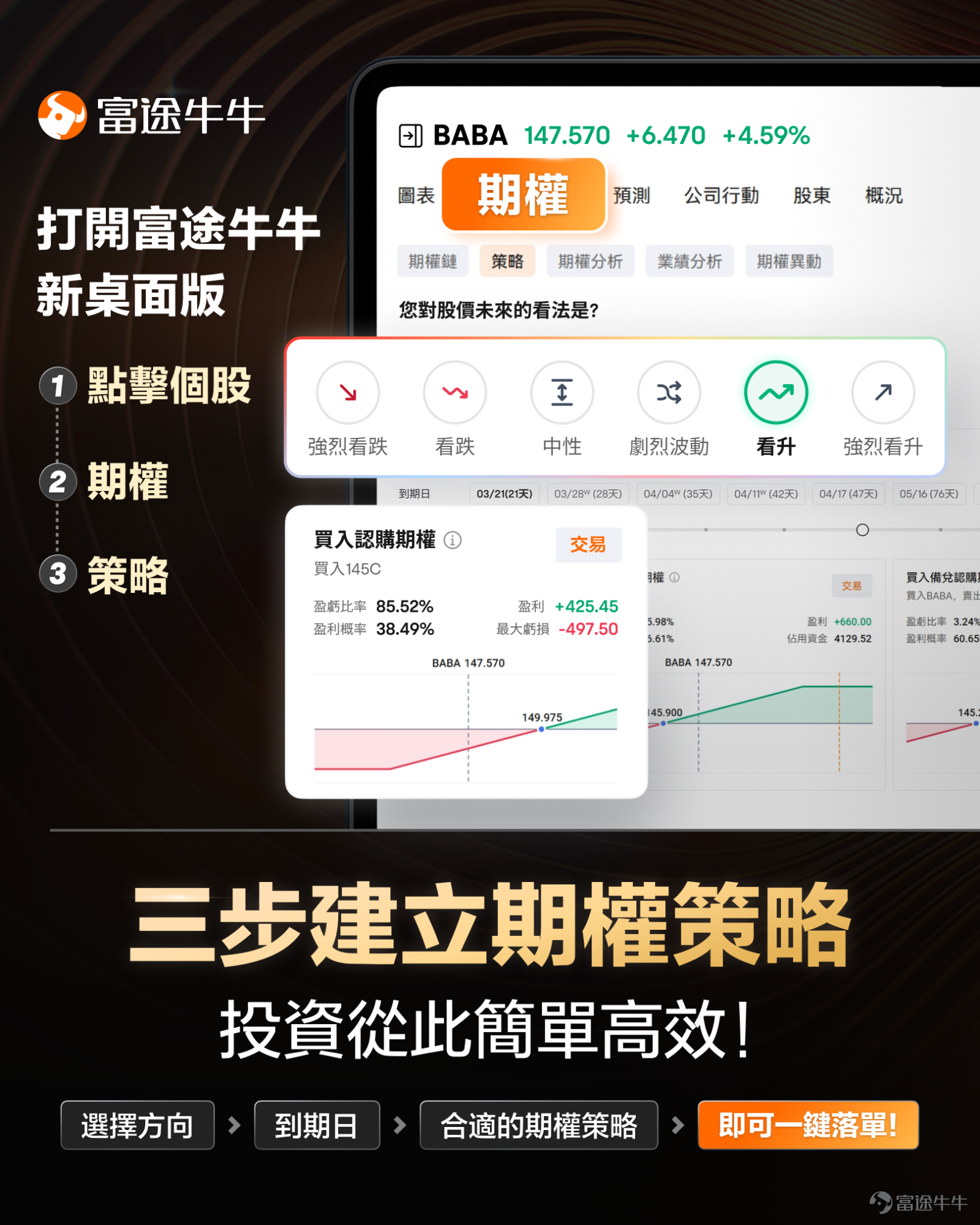
🚀【Options Must See】The new desktop version of Options, customize your exclusive Options strategy in three steps.
In the Futubull community, it is often seen that: when the underlying stock rises, the mooer's Options make money; when the underlying stock falls, the Options are still profitable.
Based on this, the Options expert often receives questions from mooers: how to use Options to still profit when the underlying stock is falling? How to choose an Options that is suitable for oneself? What strategy should be used for different market conditions? What ROI can be obtained?
The market is changing rapidly, and there are hundreds of Options strategies, so it is not an easy task for the expert to recommend a suitable Options.。
。However, now,everyone can quickly customize a personal Options strategy based on their own perspective and risk preference with just a few taps.The secret is in:Futubull's new desktop version
Note: The Options strategy feature is available only in the new desktop version; the mobile version is not yet online.
![In the Futubull community, it is often seen that: when the underlying stock rises, the mooer's Options make money; when the underlying stock falls, the Options are still profitable. Based on this, the Options expert often receives questions from mooers: how to use Options to still profit when the underlying stock is falling? How to choose an Options that is suitable for oneself? What strategy should be used for different market conditions? What ROI can be obtained?[Shocked][Shocked] The market is changing rapidly, and there are hundreds of Options strategies, so it is not an easy task for the expert to recommend a suitable Options.[Concerned]。 However, now,everyone can quickly customize a personal Options strategy based on their own perspective and risk preference with just a few taps.The secret is in:[Share Link: Futubull's new desktop version] Note: The Options strategy feature is available only in the new desktop version; the mobile version is not yet online. In the new desktop version, customizing an Options strategy only takes three steps.Let's quickly learn about it together: Taking TSLA options as an example, we first find the options page: Search for "TSLA" — click on "Options" — click on "Strategy" to enter the strategy selection page. Next, let's go through the steps to customize the Options strategy officially: 📈 Step 1: Choose the market direction EveryoneChoose the direction based on your outlook on future stock prices: Strongly Bearish, Bearish, Neutral, Highly Volatile, Bullish, Strongly Bullish If you think TSLA might rise slightly in the future, you can choose "Bullish". 📝 Step 2: Customize Options strategy ① Determine Target Price: What price do you think TSLA may rise to in the future, or...](https://nnqimage.futunn.com/sns_client_feed/999908/20250326/web-1742957156077-i7Ybi1q4Hc.png/big?area=2&is_public=true&imageMogr2/ignore-error/1/format/webp)
In the new desktop version, customizing an Options strategy only takes three steps.Let's quickly learn about it together:
Taking TSLA options as an example, we first find the options page:
Search for "TSLA" — click on "Options" — click on "Strategy" to enter the strategy selection page.
![In the Futubull community, it is often seen that: when the underlying stock rises, the mooer's Options make money; when the underlying stock falls, the Options are still profitable. Based on this, the Options expert often receives questions from mooers: how to use Options to still profit when the underlying stock is falling? How to choose an Options that is suitable for oneself? What strategy should be used for different market conditions? What ROI can be obtained?[Shocked][Shocked] The market is changing rapidly, and there are hundreds of Options strategies, so it is not an easy task for the expert to recommend a suitable Options.[Concerned]。 However, now,everyone can quickly customize a personal Options strategy based on their own perspective and risk preference with just a few taps.The secret is in:[Share Link: Futubull's new desktop version] Note: The Options strategy feature is available only in the new desktop version; the mobile version is not yet online. In the new desktop version, customizing an Options strategy only takes three steps.Let's quickly learn about it together: Taking TSLA options as an example, we first find the options page: Search for "TSLA" — click on "Options" — click on "Strategy" to enter the strategy selection page. Next, let's go through the steps to customize the Options strategy officially: 📈 Step 1: Choose the market direction EveryoneChoose the direction based on your outlook on future stock prices: Strongly Bearish, Bearish, Neutral, Highly Volatile, Bullish, Strongly Bullish If you think TSLA might rise slightly in the future, you can choose "Bullish". 📝 Step 2: Customize Options strategy ① Determine Target Price: What price do you think TSLA may rise to in the future, or...](https://nnqimage.futunn.com/sns_client_feed/999908/20250326/web-1742957154681-TCFKR6B4sf.png/big?area=2&is_public=true&imageMogr2/ignore-error/1/format/webp)
Next, let's go through the steps to customize the Options strategy officially:
📈 Step 1: Choose the market direction
EveryoneChoose the direction based on your outlook on future stock prices: Strongly Bearish, Bearish, Neutral, Highly Volatile, Bullish, Strongly Bullish
If you think TSLA might rise slightly in the future, you can choose "Bullish".
![In the Futubull community, it is often seen that: when the underlying stock rises, the mooer's Options make money; when the underlying stock falls, the Options are still profitable. Based on this, the Options expert often receives questions from mooers: how to use Options to still profit when the underlying stock is falling? How to choose an Options that is suitable for oneself? What strategy should be used for different market conditions? What ROI can be obtained?[Shocked][Shocked] The market is changing rapidly, and there are hundreds of Options strategies, so it is not an easy task for the expert to recommend a suitable Options.[Concerned]。 However, now,everyone can quickly customize a personal Options strategy based on their own perspective and risk preference with just a few taps.The secret is in:[Share Link: Futubull's new desktop version] Note: The Options strategy feature is available only in the new desktop version; the mobile version is not yet online. In the new desktop version, customizing an Options strategy only takes three steps.Let's quickly learn about it together: Taking TSLA options as an example, we first find the options page: Search for "TSLA" — click on "Options" — click on "Strategy" to enter the strategy selection page. Next, let's go through the steps to customize the Options strategy officially: 📈 Step 1: Choose the market direction EveryoneChoose the direction based on your outlook on future stock prices: Strongly Bearish, Bearish, Neutral, Highly Volatile, Bullish, Strongly Bullish If you think TSLA might rise slightly in the future, you can choose "Bullish". 📝 Step 2: Customize Options strategy ① Determine Target Price: What price do you think TSLA may rise to in the future, or...](https://nnqimage.futunn.com/sns_client_feed/999908/20250326/web-1742957154302-MP0FyKuxOC.png/big?area=2&is_public=true&imageMogr2/ignore-error/1/format/webp)
📝 Step 2: Customize Options strategy
① Determine Target PriceWhat price do you think TSLA could rise to in the future, or what is the potential increase?
② Determine Expiration DateHow long do you think it will take for TSLA to reach the target price?
③ Determine Trading BudgetWhat is the total cost you expect to invest in this options portfolio?
④ Determine Risk PreferenceFor this options portfolio, do you value ROI more, or do you value the probability of profit more? Choose between the two based on your risk preference.
![In the Futubull community, it is often seen that: when the underlying stock rises, the mooer's Options make money; when the underlying stock falls, the Options are still profitable. Based on this, the Options expert often receives questions from mooers: how to use Options to still profit when the underlying stock is falling? How to choose an Options that is suitable for oneself? What strategy should be used for different market conditions? What ROI can be obtained?[Shocked][Shocked] The market is changing rapidly, and there are hundreds of Options strategies, so it is not an easy task for the expert to recommend a suitable Options.[Concerned]。 However, now,everyone can quickly customize a personal Options strategy based on their own perspective and risk preference with just a few taps.The secret is in:[Share Link: Futubull's new desktop version] Note: The Options strategy feature is available only in the new desktop version; the mobile version is not yet online. In the new desktop version, customizing an Options strategy only takes three steps.Let's quickly learn about it together: Taking TSLA options as an example, we first find the options page: Search for "TSLA" — click on "Options" — click on "Strategy" to enter the strategy selection page. Next, let's go through the steps to customize the Options strategy officially: 📈 Step 1: Choose the market direction EveryoneChoose the direction based on your outlook on future stock prices: Strongly Bearish, Bearish, Neutral, Highly Volatile, Bullish, Strongly Bullish If you think TSLA might rise slightly in the future, you can choose "Bullish". 📝 Step 2: Customize Options strategy ① Determine Target Price: What price do you think TSLA may rise to in the future, or...](https://nnqimage.futunn.com/sns_client_feed/999908/20250326/web-1742957154339-NPApIwypuf.png/big?area=2&is_public=true&imageMogr2/ignore-error/1/format/webp)
If the options expert believes that TSLA's stock price may reach 270 USD in the next 10 days, they plan to invest 100 USD in options, hoping for a balance between ROI and probability of profit. After entering the strategy parameters, you can obtain these two options strategy graphs:
![In the Futubull community, it is often seen that: when the underlying stock rises, the mooer's Options make money; when the underlying stock falls, the Options are still profitable. Based on this, the Options expert often receives questions from mooers: how to use Options to still profit when the underlying stock is falling? How to choose an Options that is suitable for oneself? What strategy should be used for different market conditions? What ROI can be obtained?[Shocked][Shocked] The market is changing rapidly, and there are hundreds of Options strategies, so it is not an easy task for the expert to recommend a suitable Options.[Concerned]。 However, now,everyone can quickly customize a personal Options strategy based on their own perspective and risk preference with just a few taps.The secret is in:[Share Link: Futubull's new desktop version] Note: The Options strategy feature is available only in the new desktop version; the mobile version is not yet online. In the new desktop version, customizing an Options strategy only takes three steps.Let's quickly learn about it together: Taking TSLA options as an example, we first find the options page: Search for "TSLA" — click on "Options" — click on "Strategy" to enter the strategy selection page. Next, let's go through the steps to customize the Options strategy officially: 📈 Step 1: Choose the market direction EveryoneChoose the direction based on your outlook on future stock prices: Strongly Bearish, Bearish, Neutral, Highly Volatile, Bullish, Strongly Bullish If you think TSLA might rise slightly in the future, you can choose "Bullish". 📝 Step 2: Customize Options strategy ① Determine Target Price: What price do you think TSLA may rise to in the future, or...](https://nnqimage.futunn.com/sns_client_feed/999908/20250326/web-1742957154433-xCdwksKqta.png/big?area=2&is_public=true&imageMogr2/ignore-error/1/format/webp)
Note: The above parameters are for operational demonstration only and do not constitute investment advice.
Some novice partners may have doubts: What do these strategies mean? How to set them up? In which scenarios are they applicable?
You just need to click on the strategy name followed by "?" to get a complete explanation. Reading it will make your choice clearer.
![In the Futubull community, it is often seen that: when the underlying stock rises, the mooer's Options make money; when the underlying stock falls, the Options are still profitable. Based on this, the Options expert often receives questions from mooers: how to use Options to still profit when the underlying stock is falling? How to choose an Options that is suitable for oneself? What strategy should be used for different market conditions? What ROI can be obtained?[Shocked][Shocked] The market is changing rapidly, and there are hundreds of Options strategies, so it is not an easy task for the expert to recommend a suitable Options.[Concerned]。 However, now,everyone can quickly customize a personal Options strategy based on their own perspective and risk preference with just a few taps.The secret is in:[Share Link: Futubull's new desktop version] Note: The Options strategy feature is available only in the new desktop version; the mobile version is not yet online. In the new desktop version, customizing an Options strategy only takes three steps.Let's quickly learn about it together: Taking TSLA options as an example, we first find the options page: Search for "TSLA" — click on "Options" — click on "Strategy" to enter the strategy selection page. Next, let's go through the steps to customize the Options strategy officially: 📈 Step 1: Choose the market direction EveryoneChoose the direction based on your outlook on future stock prices: Strongly Bearish, Bearish, Neutral, Highly Volatile, Bullish, Strongly Bullish If you think TSLA might rise slightly in the future, you can choose "Bullish". 📝 Step 2: Customize Options strategy ① Determine Target Price: What price do you think TSLA may rise to in the future, or...](https://nnqimage.futunn.com/sns_client_feed/999908/20250326/web-1742957154432-NTAjsXGPsG.png/big?area=2&is_public=true&imageMogr2/ignore-error/1/format/webp)
💡 Step 3: Place an order for trading with one click.
![In the Futubull community, it is often seen that: when the underlying stock rises, the mooer's Options make money; when the underlying stock falls, the Options are still profitable. Based on this, the Options expert often receives questions from mooers: how to use Options to still profit when the underlying stock is falling? How to choose an Options that is suitable for oneself? What strategy should be used for different market conditions? What ROI can be obtained?[Shocked][Shocked] The market is changing rapidly, and there are hundreds of Options strategies, so it is not an easy task for the expert to recommend a suitable Options.[Concerned]。 However, now,everyone can quickly customize a personal Options strategy based on their own perspective and risk preference with just a few taps.The secret is in:[Share Link: Futubull's new desktop version] Note: The Options strategy feature is available only in the new desktop version; the mobile version is not yet online. In the new desktop version, customizing an Options strategy only takes three steps.Let's quickly learn about it together: Taking TSLA options as an example, we first find the options page: Search for "TSLA" — click on "Options" — click on "Strategy" to enter the strategy selection page. Next, let's go through the steps to customize the Options strategy officially: 📈 Step 1: Choose the market direction EveryoneChoose the direction based on your outlook on future stock prices: Strongly Bearish, Bearish, Neutral, Highly Volatile, Bullish, Strongly Bullish If you think TSLA might rise slightly in the future, you can choose "Bullish". 📝 Step 2: Customize Options strategy ① Determine Target Price: What price do you think TSLA may rise to in the future, or...](https://nnqimage.futunn.com/sns_client_feed/999908/20250326/web-1742957154227-MAvK4Gd8qS.png/big?area=2&is_public=true&imageMogr2/ignore-error/1/format/webp)
Once the strategy selection is complete, justclick the "Trade" button., which will redirect to the Trade page for one-click ordering.
With the Options strategy feature,even beginners in Options can quickly get started, helping you grasp investment opportunities comprehensively, efficiently select Target Options, and become a trading master.
In addition, there are more indicators from the CSI Leading Industry Index Options tools:
🔎① Options screener
Some mooers have their own preferences when choosing Options, such as favoring near-expiry Options or preferring high IV Options as sellers, or low IV Options as buyers...
Now.The 【Options Filter】 function allows everyone to select filtering indicators and value ranges based on their own criteria, precisely targeting the desired options.
![In the Futubull community, it is often seen that: when the underlying stock rises, the mooer's Options make money; when the underlying stock falls, the Options are still profitable. Based on this, the Options expert often receives questions from mooers: how to use Options to still profit when the underlying stock is falling? How to choose an Options that is suitable for oneself? What strategy should be used for different market conditions? What ROI can be obtained?[Shocked][Shocked] The market is changing rapidly, and there are hundreds of Options strategies, so it is not an easy task for the expert to recommend a suitable Options.[Concerned]。 However, now,everyone can quickly customize a personal Options strategy based on their own perspective and risk preference with just a few taps.The secret is in:[Share Link: Futubull's new desktop version] Note: The Options strategy feature is available only in the new desktop version; the mobile version is not yet online. In the new desktop version, customizing an Options strategy only takes three steps.Let's quickly learn about it together: Taking TSLA options as an example, we first find the options page: Search for "TSLA" — click on "Options" — click on "Strategy" to enter the strategy selection page. Next, let's go through the steps to customize the Options strategy officially: 📈 Step 1: Choose the market direction EveryoneChoose the direction based on your outlook on future stock prices: Strongly Bearish, Bearish, Neutral, Highly Volatile, Bullish, Strongly Bullish If you think TSLA might rise slightly in the future, you can choose "Bullish". 📝 Step 2: Customize Options strategy ① Determine Target Price: What price do you think TSLA may rise to in the future, or...](https://nnqimage.futunn.com/sns_client_feed/999908/20250326/web-1742957154384-MbQQU4SpA8.png/big?area=2&is_public=true&imageMogr2/ignore-error/1/format/webp)
⌨️② Options Analysis
An important aspect of investment is "expectation". If we know "what the market is doing" and "what the market's expectations are", we can enhance our control over options pricing and risk-reward ratios during investment.
Now,the Options Analysis function features options transaction statistics and volatility analysis, which can help us grasp market trends.
![In the Futubull community, it is often seen that: when the underlying stock rises, the mooer's Options make money; when the underlying stock falls, the Options are still profitable. Based on this, the Options expert often receives questions from mooers: how to use Options to still profit when the underlying stock is falling? How to choose an Options that is suitable for oneself? What strategy should be used for different market conditions? What ROI can be obtained?[Shocked][Shocked] The market is changing rapidly, and there are hundreds of Options strategies, so it is not an easy task for the expert to recommend a suitable Options.[Concerned]。 However, now,everyone can quickly customize a personal Options strategy based on their own perspective and risk preference with just a few taps.The secret is in:[Share Link: Futubull's new desktop version] Note: The Options strategy feature is available only in the new desktop version; the mobile version is not yet online. In the new desktop version, customizing an Options strategy only takes three steps.Let's quickly learn about it together: Taking TSLA options as an example, we first find the options page: Search for "TSLA" — click on "Options" — click on "Strategy" to enter the strategy selection page. Next, let's go through the steps to customize the Options strategy officially: 📈 Step 1: Choose the market direction EveryoneChoose the direction based on your outlook on future stock prices: Strongly Bearish, Bearish, Neutral, Highly Volatile, Bullish, Strongly Bullish If you think TSLA might rise slightly in the future, you can choose "Bullish". 📝 Step 2: Customize Options strategy ① Determine Target Price: What price do you think TSLA may rise to in the future, or...](https://nnqimage.futunn.com/sns_client_feed/999908/20250326/web-1742957154659-B0BADKRkhj.png/big?area=2&is_public=true&imageMogr2/ignore-error/1/format/webp)
For example:
Options trading volume is high.This indicates good contract liquidity with smaller bid-ask spreads.
The Put/Call ratio has risen abnormally.The surge in Put options trading may reflect market panic sentiment.
Volatility can be viewed as the valuation of options.When IV is significantly higher than HV, it indicates that options may be overvalued, suitable for sellers; conversely, it may be undervalued, suitable for buyers.
💹The Options Curve model.
The Options Curve model is an upgraded version of the profit and loss chart.Orders can be flexibly reduced on the profit and loss chart, adjusting analysis parameters to help everyone achieve quick insights into potential returns and risk changes of different Options orders in various scenarios.
Taking TSLA Options as an example, click on [Profit and Loss Analysis] to enter Curve mode; click on [Add] to add an Option, and we can select the Option expiration date and IV below the profit and loss chart; modify the Option strike price, type, and direction.
Other Options or underlying stocks can also be added to build an Options portfolio and check the profit and loss situation of the portfolio.
![In the Futubull community, it is often seen that: when the underlying stock rises, the mooer's Options make money; when the underlying stock falls, the Options are still profitable. Based on this, the Options expert often receives questions from mooers: how to use Options to still profit when the underlying stock is falling? How to choose an Options that is suitable for oneself? What strategy should be used for different market conditions? What ROI can be obtained?[Shocked][Shocked] The market is changing rapidly, and there are hundreds of Options strategies, so it is not an easy task for the expert to recommend a suitable Options.[Concerned]。 However, now,everyone can quickly customize a personal Options strategy based on their own perspective and risk preference with just a few taps.The secret is in:[Share Link: Futubull's new desktop version] Note: The Options strategy feature is available only in the new desktop version; the mobile version is not yet online. In the new desktop version, customizing an Options strategy only takes three steps.Let's quickly learn about it together: Taking TSLA options as an example, we first find the options page: Search for "TSLA" — click on "Options" — click on "Strategy" to enter the strategy selection page. Next, let's go through the steps to customize the Options strategy officially: 📈 Step 1: Choose the market direction EveryoneChoose the direction based on your outlook on future stock prices: Strongly Bearish, Bearish, Neutral, Highly Volatile, Bullish, Strongly Bullish If you think TSLA might rise slightly in the future, you can choose "Bullish". 📝 Step 2: Customize Options strategy ① Determine Target Price: What price do you think TSLA may rise to in the future, or...](https://nnqimage.futunn.com/sns_client_feed/999908/20250326/web-1742957154537-23JdxEoqxE.png/big?area=2&is_public=true&imageMogr2/ignore-error/1/format/webp)
More interesting and useful Options features are available in the new Futu desktop version, come and explore together!
![In the Futubull community, it is often seen that: when the underlying stock rises, the mooer's Options make money; when the underlying stock falls, the Options are still profitable. Based on this, the Options expert often receives questions from mooers: how to use Options to still profit when the underlying stock is falling? How to choose an Options that is suitable for oneself? What strategy should be used for different market conditions? What ROI can be obtained?[Shocked][Shocked] The market is changing rapidly, and there are hundreds of Options strategies, so it is not an easy task for the expert to recommend a suitable Options.[Concerned]。 However, now,everyone can quickly customize a personal Options strategy based on their own perspective and risk preference with just a few taps.The secret is in:[Share Link: Futubull's new desktop version] Note: The Options strategy feature is available only in the new desktop version; the mobile version is not yet online. In the new desktop version, customizing an Options strategy only takes three steps.Let's quickly learn about it together: Taking TSLA options as an example, we first find the options page: Search for "TSLA" — click on "Options" — click on "Strategy" to enter the strategy selection page. Next, let's go through the steps to customize the Options strategy officially: 📈 Step 1: Choose the market direction EveryoneChoose the direction based on your outlook on future stock prices: Strongly Bearish, Bearish, Neutral, Highly Volatile, Bullish, Strongly Bullish If you think TSLA might rise slightly in the future, you can choose "Bullish". 📝 Step 2: Customize Options strategy ① Determine Target Price: What price do you think TSLA may rise to in the future, or...](https://nnqimage.futunn.com/sns_client_feed/999908/20250326/web-1742957155049-KUpOP5Ljqf.png/big?area=2&is_public=true&imageMogr2/ignore-error/1/format/webp)
Risk Disclaimer: The above content only represents the author's view. It does not represent any position or investment advice of Futu. Futu makes no representation or warranty.Read more


Comments (275)
to post a comment
652
360