
What are the amazing and useful features in Futubull?

Guidance for existing domestic users to update/install the Futubull App.
Dear user, Futu plans to remove the Futubull App from the Chinese app store starting on May 19, 2023.
This adjustment will not affect existing domestic customers and users from continuing to use the Futubull App. Existing domestic customers can still trade through the Futubull App, and related services and business will not be affected. The Futubull App will only be removed from the Chinese app store, and will not be affected in the Hong Kong and other overseas markets, where it can still provide normal update and download services. In the future, Futu will continue to fully serve all existing domestic customers, providing high-quality products, services, and customer experience for all existing domestic customers.
This guide is only applicable to existing domestic users, the operations for existing domestic users to update/install the Futubull App are as follows.
I. Apple Phones
You can update/install the Futubull App through the App Store, including automatic update and manual update/installation.
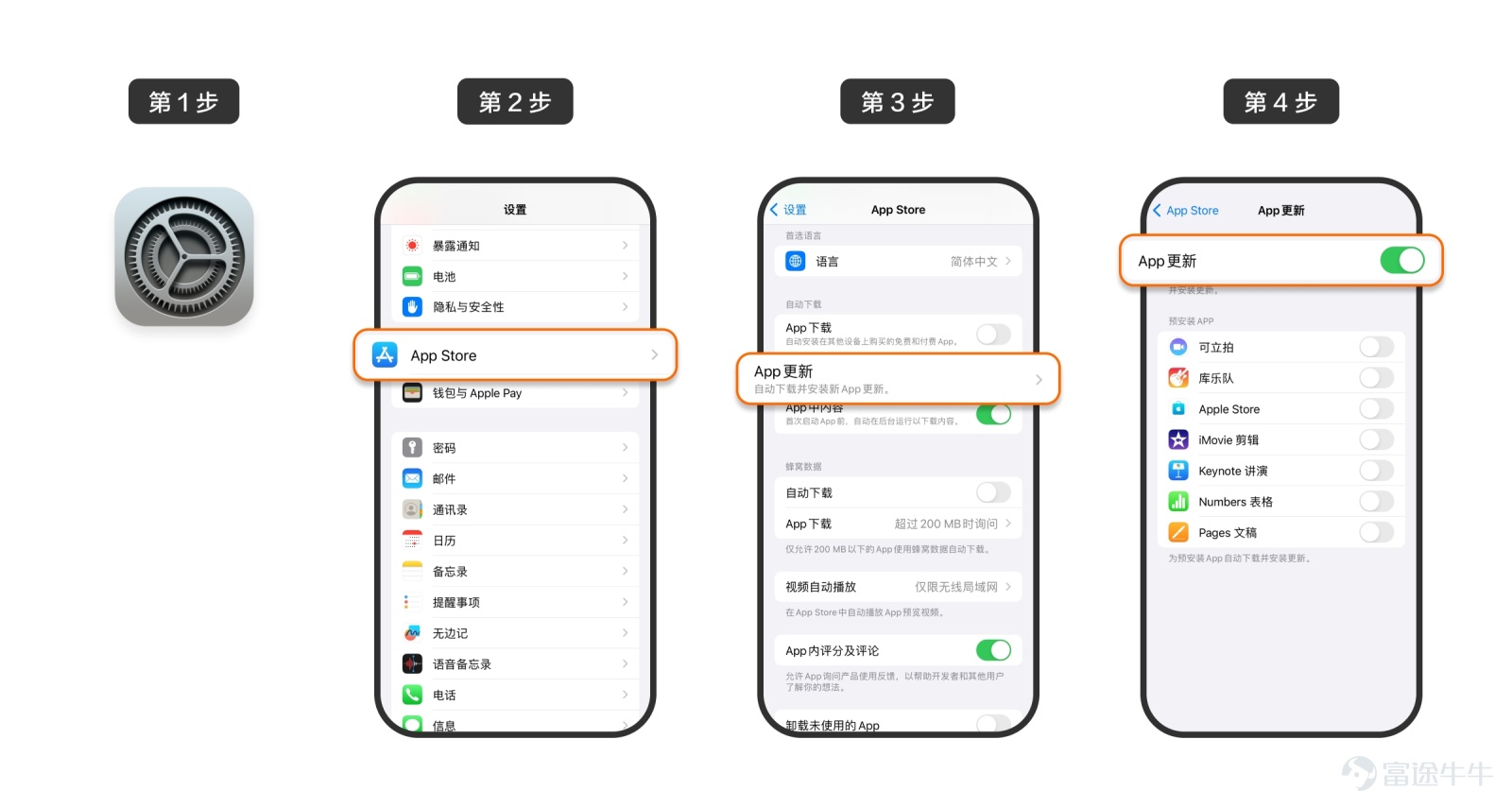
Method 1: Automatic Update
Open 【Settings】-【App Store】-【App Updates】, turn on the switch for 【App Updates】, to enable automatic updates for the Futubull App.
Note:
1) Under this method, all the apps on your phone will be automatically updated.
2) If you accidentally delete the Futubull app, please refer to the following "Method 2: Manual Update/Installation" for installation.

Method 2: Manual Update/Installation
Open the 【App Store】, click on the profile icon in the upper right corner to enter the 【Account】 page,First, on the 【Account】 page, pull down to refresh (if not refreshed, the 【Update】 button may not be visible in the following steps, so please be sure to pull down to refresh), then click on 【Apps】 (for newer iOS versions) or 【Purchased Items】 (for older iOS versions), search for "Futubull" or "Futubull" in 【All】, find the Futubull app.
1) If the Futubull app has an update, you will see the 【Update】 button, click to update.
If you have mistakenly deleted the Futubull app, you can see the 【Download】 button, click to download and install.
If you can't find the Futubull app, please refer to the following 'Question: Why can't I find "Futubull" in [App]/[Purchased Items]?'

Question: Why can't I find 'Futubull' in [App]/[Purchased Items]?
If you can't find 'Futubull' in [App]/[Purchased Items], the possible reasons and solutions are as follows:
1) 'Futubull' is hidden in [App]/[Purchased Items] and needs to be unhidden. The specific steps are as follows: open the [App Store], click on the upper right corner profile to enter the [Account] page, then click on the top account name to enter the [Account Settings] page, finally click on [Hidden Purchases], find 'Futubull' among them, click the [Unhide] button, after that, you can continue with the previous 'Method 2: Manual Update/Installation' steps.

2) The Apple ID currently logged into your phone is not the Apple ID you used to download 'Futubull' before. It may be that you switched Apple IDs or used a new Apple ID when changing phones, etc., you need to switch back to the previous Apple ID. The specific steps are as follows: open [Settings], click on the top account name to enter the [Apple ID] page, scroll to the bottom, click [Sign Out], after signing out, log in again with your previous Apple ID, then you can continue with the previous 'Method 2: Manual Update/Installation' steps.

II. Android Phone
You can update and download the official Futubull app backup file for reinstallation through the Futubull app on an Android phone in two ways.
Method 1: Update within the Futubull App.
Including reminder updates, manual updates two types.
Reminder updates:When there is an update for the Futubull App, you will receive a pop-up reminder when you launch the app. Follow the pop-up instructions to update to the latest version.
Manual Updates:Through the Futubull App【Mine】-【Settings】-【About】-【Version Update】, check and update to the latest version.

Note: For the following two situations, please refer to the following "Method 2: Download the official Futubull App backup file for reinstallation and update".
1) Unable to update within the Futubull App, may be due to reasons such as version mismatch.
2) Situations where your phone is lost, you change your phone, accidentally delete the Futubull App, etc., requiring a reinstallation or update.
Option 2: Download the official Futubull App backup file to reinstall and update.
If you encounter a situation where the Futubull App cannot be updated internally, your phone is lost, you change your phone, or accidentally delete the Futubull App, you can clickFutubull App backup fileto download and install (if unable to download, please open with your phone browser). During installation, your phone may prompt you to allow or continue installation due to system settings. Simply choose to allow or continue installation, or follow the prompt to first close relevant system settings before continuing installation. After installation, for subsequent updates, please refer to the previous 'Option 1: Futubull App Internal Updates'.
For existing domestic customers and users who encounter any problems during the use or installation of the Futubull App, you can contact us through the Futubull App online customer service or the manual customer service hotline 400-870-1818. We will wholeheartedly solve the problem for you.


Comments (118)
to post a comment
200
2869